Di-Solution — back to top
Platform for digital transformation

Your guide
through
digitalisation.

Di-Solution gives companies and organisations a tailored platform to automate and structure their business processes.

What Di-Solution does

From chaos
to structure.

Emails, scans, Excel lists, USB sticks, binders — and at the other end a single, structured data set. Di-Solution builds the platform in between.

How document analysis works
Document analysis · How it works

From text recognition
to document understanding.

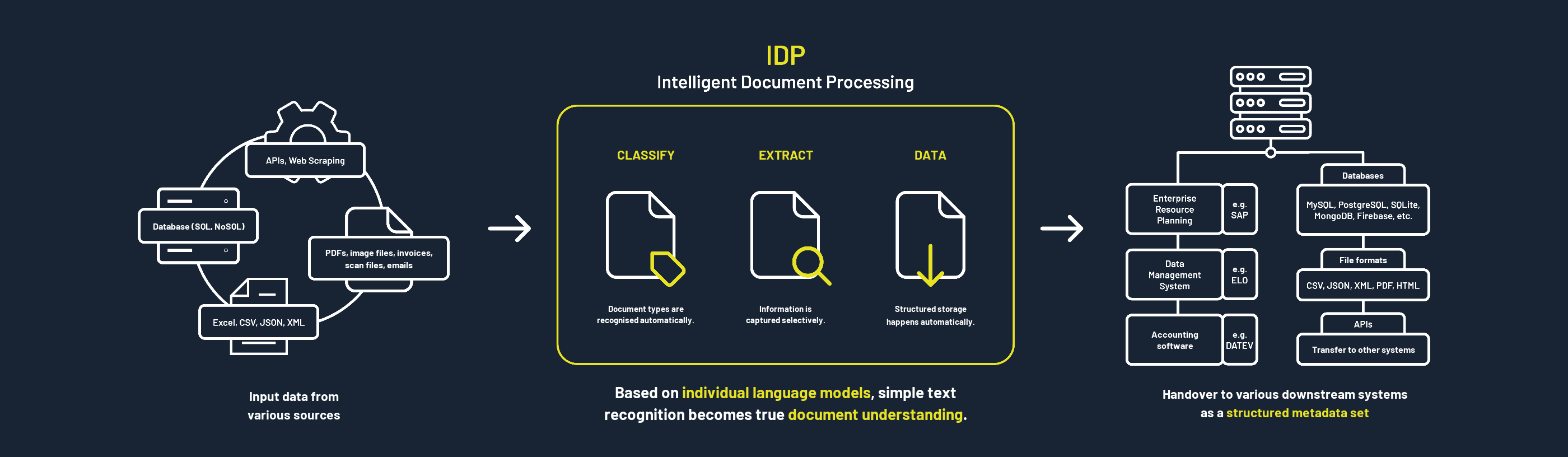
Whether your documents arrive by post, by email or from another application: IDP recognises what they are about, reads out the key details and files everything in order. The data is then ready wherever you work with it.

How IDP works: documents from different sources are recognised, read out, filed in order and then passed on to your applications
01 · Capture
What comes in
Letters, scans, emails, PDFs, Excel lists or data from another application — and entire paper archives.
02 · Document analysis
What the analysis does with it
Recognises the type of document, reads out the key details and files everything in order — automatically.
03 · Data room
Where it is ready for you
Organised, searchable and with clear access rights — ready for questions about your own records.
Option · Integration
Where it ends up
In the applications you already use — such as accounting, inventory management or digital filing.
The foundation

Understand first, then ask.

Ask-Your-Data is only as good as the data beneath it. That is why IDP comes first: every document is classified, its key data is extracted and filed with metadata. This is the basis for the data room — and only there can questions about your own records be answered reliably and with source references.

To our services
  1. 03Ask-Your-DataAsk questions about your own records in plain language.
  2. 02Data roomStructured, searchable, with clear access rights.
  3. 01Document analysis · FoundationClassify · Extract · Data — the data basis for everything above.
Services

Turning information into knowledge,

We make sure documents land in the right place automatically, workflows keep moving on their own and you always have your data in view. All from a single source, from the first consultation to day-to-day operation.

Route incoming mail automatically

Letter, email or scan: the system recognises every document, reads out the key details and forwards it straight to the right person.

Enquire

Automate workflows

Checking, approving, keeping track of deadlines: these steps run on their own until everything arrives in the software you already use, such as accounting or your archive.

Enquire

Prepare data for AI

All documents are organised and filed consistently. Later you can simply ask questions about your own records, much like in a chat.

Enquire

Everything at a glance

Clear reports show what you have, the key figures and how far each case has progressed. No more searching through long lists.

Enquire

Digitise paper archives

Our digitisation partners scan your files in your region, and we process them digitally. That makes your paper archive searchable and usable, too.

Enquire

Keep data secure

Data protection in line with the GDPR and, if you wish, entirely on your own servers. Clear rules define who may see what, and confidential details are blacked out automatically. This is built in from the start, not added later.

More on security
The foundationRecognise · Read out · DataCompare three quality levels
AI in three levels for

Document analysis,

All three options include the same steps and deliver the result as a report. They differ in the AI model — and therefore in accuracy and price.

Document analysis: comparison of the Standard, Advanced and Confidential options
Quick startStandardProven AI models: fast results at the lowest price. State of the ArtAdvancedThe most powerful AI models available today: noticeably more accurate results, even with difficult documents. Tailor-madeConfidentialModels trained on your documents, running on dedicated, isolated infrastructure — hosted by us or on your premises.
AI models Proven standard models, fast and affordable State-of-the-art models Individually trained and customised
Includes
OCR + handwriting Reliable for print, limited for handwriting Reliable for print and handwriting, even with poor originals Trained on your documents, including special scripts
Automated document separation With clear markers such as separator sheets, barcodes or form changes Even without separator sheets, based on content According to your rules, even for mixed batches
Classification Common document types such as invoices, contracts, letters Including fine sub-types and rare documents Exactly according to your own document structure
Extraction Standard fields such as date, amount, sender Including tables, free text and relationships Every field you need, checked against your reference set
File naming Based on standard values such as date or document type Using your individually extracted fields (custom extraction) Using your individually extracted fields (custom extraction)
Integration CSV and Excel spreadsheets Custom integration and REST API on request Included: custom integration and REST API
Accuracy Good for standard documents and simple processes Very good, even for complex documents and processes 100 % — tailored to your documents and processes
Result Report Report Report
Operation Hosted, GDPR-compliant Hosted, GDPR-compliant Requires dedicated infrastructure — fully on-premises, hosted by us or by you
Price €€€Lowest entry price €€€Higher, for better results €€€Highest effort · on request only
Discuss Standard Discuss Advanced Request Confidential
Industries & use cases

Industries we know,

Expand to see the processes we automate there.

Mail, applications and legacy records land in the e-file in a structured way — not in the in-tray.

  1. Digital mailroomLetters and emails are recognised, assigned to the right department and forwarded with a file reference.
  2. Application processingDetails from applications are read out and automatically checked for completeness.
  3. Retro-digitisationArchive holdings are captured, given metadata and stored for the long term with a checksum.
Hands over toE-file · DMS · specialist applicationsReference[Customer reference – pending approval]
Case study (PDF, German)Discuss use case

Customer mail and grid applications go straight into the right systems.

  1. Customer correspondenceChange-of-address notices, meter readings and complaints are recognised and assigned to the right customer account.
  2. Grid connectionApplications with plans and supporting documents are read out, checked and assigned to the matching case.
  3. Contract archiveSupply, easement and maintenance contracts are filed searchably with terms and deadlines.
Hands over toBilling system · ERP (SAP) · DMSReference[Customer reference – pending approval]
Discuss use case

Applications, reports and circulars — captured once, found any time.

  1. Membership applicationsDetails from applications and change notices are read out and transferred to member management.
  2. Funding and reporting proceduresForms and supporting documents are checked for completeness and assigned to the right case.
  3. Knowledge archiveCirculars, minutes and statements are tagged and filed searchably.
Hands over toMember management · DMS · intranetReference[Customer reference – pending approval]
Discuss use case

The scan becomes a product: enriched data instead of mere image files.

  1. Document analysisScanned holdings are classified, read out and delivered with meaningful file names.
  2. Handover to clientsDocuments and data go to the client via data room, handover spreadsheet or interface.
  3. Platform under your own brandThe IDP platform runs under your own branding — with the same process at every location.
Hands over toData room · client DMS · interfacesReference[Customer reference – pending approval]PartnerKodak Alaris
Case study (PDF, German)Discuss use case

Receipts arrive in every form — they are booked in one.

  1. Receipt captureInvoices, receipts and bank statements are recognised; date, amount, tax and supplier are read out.
  2. Client intakeDocuments sent by upload, email or on paper are sorted to the right client.
  3. DATEV transferThe extracted data goes to DATEV or financial accounting in a structured format.
Hands over toDATEV · ERP · DMSReference[Customer reference – pending approval]
Discuss use case

From delivery notes to inspection instructions — paper no longer slows things down.

  1. Incoming invoicesInvoices are read out, matched against purchase order and delivery note and routed for approval.
  2. Delivery notesLine items and quantities are captured and assigned to the matching order in the ERP.
  3. Inspection and QA documentsInspection instructions and reports are read out, tables included, and passed on in a structured format.
Hands over toERP (SAP) · DMS · QM systemReference[Customer reference – pending approval]
Case study (PDF, German)Discuss use case

Searchable files and contracts — with data protection as a basic requirement.

  1. Contract filingContracts are recognised; parties, terms and deadlines are read out and monitored.
  2. File digitisationPaper files are captured and assigned to the right matter file.
  3. Data roomDocuments for audits and transactions are provided in a structured, access-protected way.
Hands over toPractice management software · DMS · data roomReference[Customer reference – pending approval]
Discuss use case

Tenant requests arrive through every channel — they are managed in one process.

  1. Manage tenant requestsEmails, letters and forms are classified, routed to the responsible clerk and tracked with status and deadline until answered.
  2. Damage reportsReports including photos are assigned to the residential unit and passed on as a job to caretakers or tradespeople.
  3. Digital twinFor large estates, a digital replica of buildings, areas and installations is created — defects are located there and tradespeople coordinated precisely.
Hands over toProperty ERP · CAFM · ticket systemReference[Customer reference – pending approval]
Case study (PDF, German)Discuss use case
In good company

Customers & partners.

Cities, associations, corporations and specialists rely on Di-Solution for their digital transformation.


Stadt Alzey
Stadt Attendorn
Stadt Büdingen
DFB
FEROX
RKT
RKW Hessen
Landesamt für Verbraucherschutz Sachsen-Anhalt
neworld
aedus
NOTO
motio
go4scan
b
AI & implementation partners
Reisswolf Sachsen
Kodak Alaris
Software partners
HEAG
Next step

Book a call,

We listen, assess and make suggestions.

Your topic
* Required field